AI Tools for Business Coaches: Complete Guide | BizPlan AI Pro
Introduction
The business coaching industry in India is at an inflection point, particularly with the rise of AI tools for business coaches. You became a coach to transform businesses—not to spend 20+ hours a week doing manual client research, preparing frameworks, and analyzing documents. Yet here we are, drowning in prep work while our coaching calendars remain half-empty because we don’t have time for more clients.
The paradox? The better you are as a coach, the more thorough your preparation, which means fewer clients you can serve.
Enter artificial intelligence.
AI tools are revolutionizing how business coaches work—not by replacing the human element of coaching (impossible), but by handling the time-consuming research and analysis that happens before you sit down with your client.
In this comprehensive guide, you’ll discover:
- ✅ The 7 types of AI tools every modern coach needs
- ✅ Detailed reviews of the top 12 AI coaching tools for Indian coaches
- ✅ Real ROI calculations (time saved, clients gained, revenue impact)
- ✅ How to choose the right tools for your coaching style
- ✅ Ethical considerations when using AI in coaching
Spoiler alert: Coaches using AI assistants are managing 2-3x more clients without sacrificing session quality. Let’s see how.
Why Business Coaches Are Turning to AI in 2025
The Traditional Coaching Bottleneck
Let’s break down a typical week for a business coach managing 12 clients:
Time Breakdown:
- Actual coaching sessions: 12 hours (1 hour each)
- Session preparation: 24-36 hours (2-3 hours per session)
- Document review: 8-10 hours (client business plans, financials, market research)
- Follow-up emails & notes: 6-8 hours
- Administrative work: 5-6 hours
Total: 55-77 hours/week for just 12 clients
At this rate, taking on even 3 more clients means working 70+ hours/week. Burnout guaranteed.
The AI Breakthrough
Could you cut session prep from 2-3 hours to 5-10 minutes?
That’s not a fantasy—it’s what AI coaching assistants do today. They:
- Analyse client documents in seconds (business plans, financials, market research)
- Generate strategic discussion questions tailored to each client’s situation
- Identify red flags and assumptions you should probe
- Suggest relevant frameworks (GROW, SMART, OKR, Business Model Canvas)
- Create session summaries and action plans
Result: Same quality coaching, 90% less prep time, 3x client capacity.
The 7 Categories of AI Tools for Coaches
Before diving into specific tools, understand the AI coaching technology landscape:
1. AI Coaching Assistants (Your Virtual Research Team)
What they do: End-to-end session prep—client analysis, discussion points, frameworks, red flags
Best for: Business coaches, executive coaches, leadership coaches
Time saved: 15-20 hours/week
Example: BizPlan AI Pro Coach Assistant, CoachVantage AI
Typical Cost: ₹5,000-15,000/month or pay-per-use
2. AI Note-Taking & Transcription Tools (Session Documentation)
What they do: Record coaching sessions, generate transcripts, and extract action items
Best for: Coaches who want automated session documentation
Time saved: 3-5 hours/week
Example: Otter.ai, Fireflies.ai, Grain
Typical Cost: ₹800-2,000/month
⚠️ Ethics Note: Always get client permission before recording
3. AI Content Generators (Thought Leadership)
What they do: Help coaches create blog posts, LinkedIn content, and email newsletters
Best for: Coaches building their personal brand
Time saved: 5-8 hours/week
Example: ChatGPT, Jasper, Copy.ai
Typical Cost: Free – ₹4,000/month
4. AI Client Management & CRM (Organisation)
What they do: Track client progress, automate follow-ups, manage coaching pipelines
Best for: Coaches with 15+ clients
Time saved: 4-6 hours/week
Example: HubSpot (with AI), Pipedrive, Practice Better
Typical Cost: ₹2,000-8,000/month
5. AI Financial Analysis Tools (Numbers Deep-Dive)
What they do: Analyse client financials, identify cash flow issues, benchmark performance
Best for: Business coaches working with revenue-stage startups
Time saved: 2-4 hours/week
Example: Fathom, Jiffy.ai, Numeric
Typical Cost: ₹3,000-10,000/month
6. AI Presentation & Report Builders (Client Deliverables)
What they do: Generate professional coaching reports, action plans, and presentations
Best for: Coaches who provide written deliverables
Time saved: 3-5 hours/week
Example: Beautiful.ai, Tome, Gamma
Typical Cost: ₹1,000-3,000/month
7. AI Learning Assistants (Coach Development)
What they do: Keep coaches updated on the latest frameworks, research, and industry trends
Best for: Coaches committed to continuous learning
Time saved: Qualitative (better insights)
Example: Perplexity AI, Consensus, Elicit
Typical Cost: Free – ₹1,500/month
Top 12 AI Tools for Business Coaches in India (Detailed Reviews)
🥇 #1: BizPlan AI Pro – AI Coach Assistant
Category: AI Coaching Assistant
Best For: Business coaches, startup coaches, executive coaches in India
What It Does:
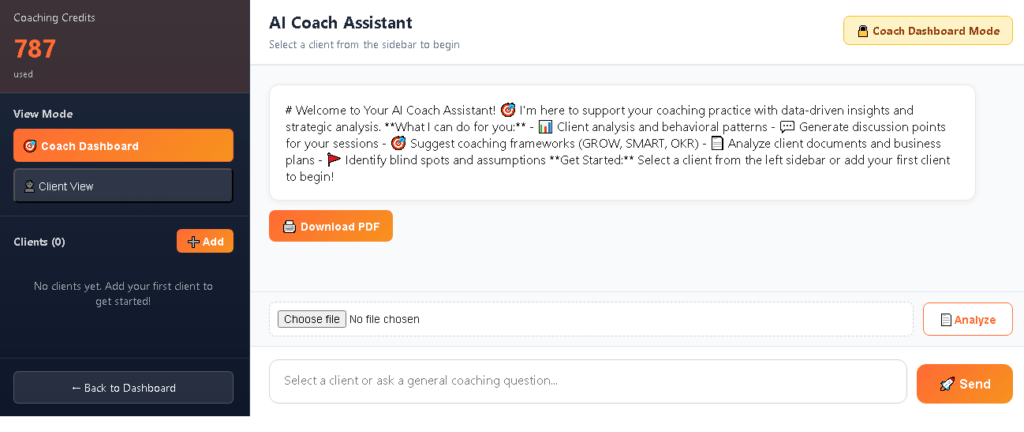
- Upload client documents (business plans, financials, pitch decks) and get instant analysis
- AI generates 5-7 strategic coaching questions tailored to the client’s situation
- Red flag detection (identifies assumptions, biases, market risks)
- Framework recommendations (GROW, SMART, OKR, SWOT, Business Model Canvas)
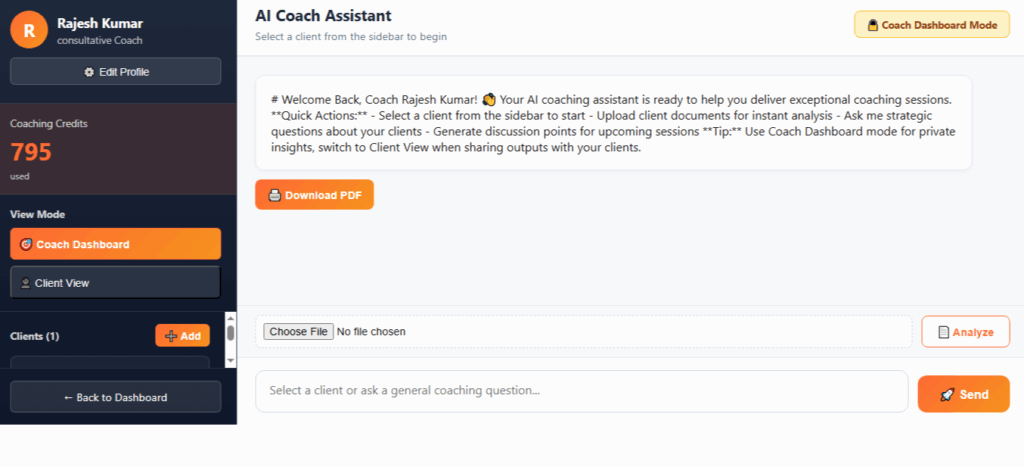
- Private coach notes (insights only for you, not client-facing)
- Toggle between “Coach Dashboard” and “Client View” for sharing
- Multi-client management dashboard
- Session phase tracking (Discovery, Strategy, Execution, Accountability)
Why Indian Coaches Love It:
- Built specifically for the Indian business ecosystem
- Pay-as-you-go pricing (₹439 for 50 analyses—no monthly subscription)
- Hindi and English support
- Understands Indian market dynamics (regulatory, cultural, consumer behaviour)
- Credits never expire
Pricing: ₹439 for 50 AI analyses (₹8.78 per session prep)
ROI Example:
- Manual prep time: 2.5 hours/session × ₹3,000/hour = ₹7,500 opportunity cost
- AI prep time: 5 minutes
- Savings: 2.4 hours × ₹3,000 = ₹7,200 per session
- Investment: ₹8.78 per session
- Net benefit: ₹7,191 per session (819x ROI)
Pros:
✅ Purpose-built for coaches (not a generic AI chatbot)
✅ No subscription commitment
✅ Structured outputs (Analysis, Discussion Points, Red Flags, Frameworks, Coach Notes)
✅ India-focused (understands local business context)
✅ Client management dashboard
✅ Document analysis (PDF, DOCX, TXT)
Cons:
❌ Newer platform (less brand recognition than international tools)
❌ No mobile app yet (web-based only)
❌ Limited integrations with other coaching software
User Review:
“I went from 12 clients to 28 in 3 months. The AI does all my session prep—I show up and coach. The red flag detection alone has saved two clients from costly mistakes.” — Priya Sharma, Leadership Coach, Mumbai.
Try It: Get 1 free analysis credit →
#2: ChatGPT with Custom GPT for Coaches
Category: General AI Assistant (customizable)
Best For: Tech-savvy coaches who want flexibility
What It Does:
- General conversational AI that can be prompted for coaching tasks
- Custom GPTs allow you to create coach-specific assistants
- Analyse text-based client information
- Generate coaching questions, frameworks, and summaries
- Brainstorm session strategies
Why Coaches Use It:
- Extremely flexible (can do almost anything if prompted correctly)
- Large knowledge base
- Can analyze long documents
- Multi-purpose (coaching + content + admin)
Pricing:
- Free tier available
- ChatGPT Plus: $20/month (~₹1,650/month)
- ChatGPT Team: $25/user/month (~₹2,060/month)
Pros:
✅ Powerful and versatile
✅ Constantly improving
✅ Large ecosystem of custom GPTs
✅ Can handle multiple tasks beyond coaching
Cons:
❌ Requires good prompting skills (learning curve)
❌ Not purpose-built for coaches (generic outputs)
❌ No client management features
❌ No structured coaching outputs
❌ Subscription required for the best model
Best Use Case: Supplement to a specialized coaching tool, not a replacement
#3: Otter.ai – AI Meeting Note-Taker
Category: AI Transcription & Note-Taking
Best For: Coaches who want automated session documentation
What It Does:
- Records and transcribes coaching sessions in real-time
- Identifies speakers automatically
- Generates meeting summaries
- Extracts action items
- Searchable transcript library
- Integrates with Zoom, Google Meet, Microsoft Teams
Why Coaches Use It:
- Never miss important details from sessions
- Easy to review what the client said weeks later
- Shareable session summaries with clients
- Reduces post-session admin work
Pricing:
- Free: 600 minutes/month (enough for ~10 sessions)
- Pro: $16.99/month (~₹1,400/month) – 6,000 minutes
- Business: $30/user/month (~₹2,500/month)
Pros:
✅ Excellent transcription accuracy
✅ Real-time transcription
✅ Generous free tier
✅ Easy integration with video platforms
Cons:
❌ Requires client permission to record
❌ Doesn’t generate coaching insights (just transcription)
❌ Privacy concerns (data stored on US servers)
❌ Works only with virtual sessions (not in-person)
Privacy Tip: Always inform clients before recording and get written consent
#4: Notion AI – Workspace + AI Assistant
Category: AI-Enhanced Workspace
Best For: Coaches who want combined note-taking + client management + AI
What It Does:
- Database for client profiles, session notes, and action plans
- AI writing assistant within Notion docs
- Summarise session notes automatically
- Generate coaching frameworks and templates
- Custom databases for client tracking
Why Coaches Use It:
- All-in-one workspace (replaces 5+ tools)
- Flexible structure (customize for your coaching style)
- AI embedded in the workspace you already use
- Beautiful client-facing pages (share reading lists, resources)
Pricing:
- Free tier available (limited AI usage)
- Plus: $10/month (~₹825/month) with AI add-on $10/month
- Total: ~₹1,650/month for full setup
Pros:
✅ Extremely flexible
✅ Beautiful interface
✅ Client portal capability
✅ AI integrated with your notes
Cons:
❌ Steep learning curve
❌ AI is basic (not coaching-specific)
❌ Can become overwhelming (too many features)
❌ Requires manual setup (not plug-and-play)
Best Use Case: Coaches who love customization and want one tool for everything
#5: Beautiful.ai / Tome – AI Presentation Builders
Category: AI Report & Presentation Generators
Best For: Coaches who deliver visual reports to clients
What It Does:
- Generate professional presentations from text prompts
- Auto-design slides with proper layouts
- Create coaching reports and action plans
- Visual strategy frameworks (Business Model Canvas, SWOT, etc.)
- Export as PDF or PowerPoint
Why Coaches Use It:
- Saves 2-3 hours per client report
- Professional polish without design skills
- Impresses clients (visual deliverables)
- Easy to update and iterate
Pricing:
- Beautiful.ai: $12/month (~₹990/month)
- Tome: Free tier available, Pro at $16/month (~₹1,320/month)
Pros:
✅ Fast professional presentations
✅ No design skills needed
✅ Templates for common coaching deliverables
✅ Client-ready output
Cons:
❌ Limited customization compared to PowerPoint
❌ Generic business templates (not coaching-specific)
❌ Subscription required for full features
Best Use Case: Coaches who charge premium fees and deliver written/visual reports
#6: Perplexity AI – Research Assistant
Category: AI Research & Learning Tool
Best For: Coaches staying updated on industry trends
What It Does:
- AI-powered search engine with sources
- Research industry-specific trends for clients
- Get summaries of the latest business frameworks
- Find case studies and examples
- Verify facts and statistics
Why Coaches Use It:
- Faster research than Google (AI summarises)
- Always cites sources (credible information)
- Great for understanding the client’s industry quickly
- Helps coaches stay knowledgeable across sectors
Pricing:
- Free tier (limited searches)
- Pro: $20/month (~₹1,650/month) – unlimited searches
Pros:
✅ Excellent for industry research
✅ Cites sources (trustworthy)
✅ Faster than traditional search
✅ Good free tier
Cons:
❌ Not designed for coaching-specific tasks
❌ Requires manual synthesis (doesn’t generate coaching questions)
❌ Generic tool (not tailored to coaches)
Best Use Case: Background research before client sessions
#7: Fathom – AI for Client Financials
Category: AI Financial Analysis
Best For: Business coaches working with revenue-stage startups
What It Does:
- Connects to client’s accounting software (QuickBooks, Xero, Tally)
- Generates financial health reports
- Cash flow analysis and forecasting
- Identifies financial red flags automatically
- Benchmarking against industry standards
Why Coaches Use It:
- Spot financial issues clients don’t see
- Data-driven coaching conversations
- Professional financial reports
- Coach doesn’t need to be an accountant
Pricing:
- Custom pricing (typically ₹5,000-10,000/month per connected account)
- Usually paid by client, not coach
Pros:
✅ Deep financial insights
✅ Professional-grade analysis
✅ Saves hiring a financial analyst
✅ Catches issues early
Cons:
❌ Expensive
❌ Requires client’s financial system access
❌ Overkill for early-stage or non-revenue clients
❌ Complex setup
Best Use Case: Coaches specializing in financial turnarounds or growth strategy
#8: HubSpot CRM with AI (Sales Hub)
Category: AI-Enhanced CRM
Best For: Coaches managing 20+ clients and a sales pipeline
What It Does:
- Client relationship management
- AI email writing (follow-ups, proposals)
- Pipeline management (prospects → clients)
- Automated reminders and follow-ups
- Predictive lead scoring (who’s likely to buy)
Why Coaches Use It:
- Never lose track of prospects
- Automate repetitive communication
- Professional client onboarding
- Track coaching package sales
Pricing:
- Free tier (basic CRM)
- Starter: ₹1,600/month
- Professional: ₹7,200/month (includes AI features)
Pros:
✅ Industry-standard CRM
✅ Excellent free tier
✅ Scales with your practice
✅ Email automation saves hours
Cons:
❌ Complex (many features you won’t use)
❌ AI features only in expensive tiers
❌ Designed for sales teams, not coaches specifically
❌ Learning curve
Best Use Case: Established coaches treating coaching as a scalable business
#9: Jasper AI – Content Creation for Coaches
Category: AI Content Generator
Best For: Coaches building thought leadership (blog, LinkedIn, newsletter)
What It Does:
- Generate blog posts, articles, and social media posts
- Email newsletter writing
- LinkedIn thought leadership content
- Case study and testimonial writing
- SEO optimization
Why Coaches Use It:
- Consistent content marketing (client acquisition)
- Overcomes writer’s block
- Faster content production
- Professional tone
Pricing:
- Creator: $49/month (~₹4,050/month)
- Teams: $125/month (~₹10,300/month)
Pros:
✅ High-quality content output
✅ Coaching-specific templates available
✅ Faster than writing manually
✅ Consistent brand voice
Cons:
❌ Expensive for solo coaches
❌ Requires editing (not publish-ready)
❌ Generic advice (needs your expertise layered in)
❌ Subscription commitment
Best Use Case: Coaches who are serious about content marketing and inbound lead generation
#10: Practice Better – Coaching Platform with AI
Category: All-in-One Coaching Platform (with AI features)
Best For: Health, wellness, and life coaches (less for business coaching)
What It Does:
- Client portal for programs and resources
- Scheduling and payments
- Form builders (intake forms, assessments)
- AI meal planning and workout generators (health-focused)
- Client messaging
Why Some Coaches Use It:
- Comprehensive platform
- Professional client experience
- Reduces the need for multiple tools
Pricing:
- $29/month (~₹2,400/month) base
- AI features: Additional $20/month (~₹1,650/month)
Pros:
✅ All-in-one solution
✅ White-label client portal
✅ Professional appearance
Cons:
❌ Not designed for business coaches (health/wellness focus)
❌ AI features limited (not strategic coaching insights)
❌ Expensive for the Indian market
❌ Overkill if you need session prep help
Best Use Case: Health coaches or coaches offering programs (not 1-on-1 business coaching)
#11: Fireflies.ai – AI Meeting Assistant
Category: AI Meeting Transcription & Analysis
Best For: Coaches wanting conversation analytics
What It Does:
- Records and transcribes coaching sessions
- Analyses talk-to-listen ratio (are you talking too much?)
- Tracks topics discussed across sessions
- Generates meeting summaries
- Integrates with the calendar
Why Coaches Use It:
- Improve coaching technique (data on your coaching style)
- Never forget what the client said
- Track progress over time
- Share summaries with clients
Pricing:
- Free: 800 minutes/month
- Pro: $18/month (~₹1,485/month)
- Business: $29/user/month (~₹2,400/month)
Pros:
✅ Good analytics (coach self-improvement)
✅ Automatic meeting capture
✅ Generous free tier
✅ Conversation insights
Cons:
❌ Requires recording permission
❌ Doesn’t generate coaching strategies
❌ Data privacy concerns
❌ Virtual-only (not in-person)
Best Use Case: Coaches who want to improve their coaching craft through data
#12: Copy.ai – AI Writing Assistant
Category: AI Copywriting Tool
Best For: Coaches creating marketing copy, proposals, and emails
What It Does:
- Write coaching package descriptions
- Sales emails and follow-ups
- Landing page copy
- Social media captions
- Testimonial requests
Why Coaches Use It:
- Professional copywriting without hiring a writer
- Faster client communication
- Better conversion on sales pages
- Consistent messaging
Pricing:
- Free: 2,000 words/month
- Pro: $49/month (~₹4,050/month) – unlimited
Pros:
✅ Easy to use
✅ Good for non-writers
✅ Marketing-focused (helps client acquisition)
✅ Affordable compared to hiring a copywriter
Cons:
❌ Generic marketing copy (needs personalization)
❌ Not coaching session-focused
❌ Subscription required for meaningful use
❌ Requires editing
Best Use Case: Coaches who struggle with writing sales/marketing copy
How to Choose the Right AI Tools for Your Coaching Practice
Decision Framework: 5 Questions to Ask
1. What’s Your Biggest Time Drain?
If it’s…You need…Recommended tool
Session preparation AI Coaching Assistant BizPlan AI Pro Coach Assistant
Documentation AI Transcription Otter.ai / Fireflies.ai
Client management AI CRM HubSpot / Notion
Content creation AI Writer Jasper / Copy.ai
Research AI Search Perplexity AI
2. What’s Your Budget?
Under ₹500/month: Start with free tiers
- ChatGPT Free + Otter.ai Free + Perplexity Free = ₹0
- Pay-per-use: BizPlan AI Pro (₹439 for 50 analyses, use as needed)
₹500-2,000/month: Essential toolkit
- BizPlan AI Pro (pay-as-you-go) + ChatGPT Plus (₹1,650) = ₹1,650/month + usage
₹2,000-5,000/month: Professional setup
- BizPlan AI Pro + Otter.ai Pro + Notion AI = ~₹3,500/month
₹5,000+/month: Full automation
- All of the above + HubSpot + Jasper = ₹10,000+/month
3. How Many Clients Do You Have?
1-10 clients: Free tools + one paid AI assistant sufficient
10-20 clients: Invest in AI coaching Assistant + CRM
20-30 clients: Full toolkit needed to manage capacity
30+ clients: Must have AI automation or hire an Assistant
4. What’s Your Coaching Style?
Directive (advice-giving): Heavy on analysis tools (BizPlan AI Pro, Fathom)
Socratic (question-based): Focus on question generators (AI coaching assistants)
Facilitative (client-led): Transcription tools to capture the client’s words
Consultative (mix): Comprehensive AI assistant + research tools
5. What’s Your Tech Comfort Level?
Tech-phobic: Start with one simple tool (BizPlan AI Pro or Otter.ai)
Tech-comfortable: ChatGPT + 2-3 specialized tools
Tech-savvy: Build custom GPTs + integrate multiple tools
The ROI of AI Tools for Coaches (Real Numbers)
Case Study: Priya Sharma (Leadership Coach, Mumbai)
Before AI (12 clients):
- Weekly hours: 65 hours
- Annual revenue: ₹28.8 lakhs (₹2.4L/month × 12)
- Hourly rate: ₹6,923 (including all work, not just sessions)
- Client capacity: Maxed out at 12
After AI Implementation (28 clients):
- Weekly hours: 62 hours (fewer hours, more clients!)
- Annual revenue: ₹67.2 lakhs (₹5.6L/month × 12)
- Effective hourly rate: ₹20,769
- AI tool costs: ₹5,000/month (₹60,000/year)
ROI Calculation:
- Revenue increase: ₹38.4 lakhs/year
- AI investment: ₹60,000/year
- Net benefit: ₹37.8 lakhs/year
- ROI: 6,300%
Time Savings Breakdown
Task Without AI With AI Time Saved
Session prep 2.5 hrs 10 min 2.3 hrs/session
Document analysis 1.5 hrs 5 min 1.4 hrs/doc
Session notes 30 min 5 min 25 min/session
Client research 1 hr 5 min 55 min/client
Framework selection 20 min 2 min 18 min/session
TOTAL per client/week 6 hrs 30 min 5.5 hrs/client
With 15 clients: 82.5 hours saved per week = 2 full work weeks
Ethical Considerations: Using AI in Coaching Responsibly
The Coach’s AI Code of Ethics
1. Transparency with Clients
The Debate: Should you tell clients you use AI?
Our Stance: Full disclosure isn’t always necessary, but honesty is if asked.
Framework:
- ✅ “I use AI tools to prepare for our sessions, similar to how I use Google or frameworks”
- ✅ “This helps me arrive more prepared so we maximize our time together”
- ❌ Don’t position AI as “doing the coaching” (you’re still the expert)
- ❌ Don’t hide it if directly asked
Most coaches find: Clients don’t care about your prep tools—they care about results.
2. Data Privacy & Confidentiality
Critical Rules:
- ✅ Only upload anonymized client data to AI tools
- ✅ Check AI tool’s data policy (is data used for training?)
- ✅ Use tools with encryption (HTTPS, end-to-end encryption)
- ✅ Get client permission before recording sessions
- ❌ Never upload sensitive financial data to free AI tools
- ❌ Don’t share client details in prompts (use “Client A” instead of real names)
Best Practice: Use India-based or privacy-first tools when possible (fewer data jurisdiction issues)
3. AI as Assistant, Not Replacement
Remember:
- AI generates insights → You interpret and contextualize
- AI suggests questions → You choose which to ask and when
- AI identifies patterns → You probe deeper with empathy
- AI provides frameworks → You adapt to the client’s unique situation
Your Value as Coach:
- Emotional intelligence (AI has zero)
- Reading body language (AI can’t see)
- Building trust (AI can’t replicate)
- Holding clients accountable (human connection required)
- Challenging assumptions empathetically (AI lacks nuance)
4. Quality Control
AI Makes Mistakes: Always review AI outputs before using
Checklist:
- ✅ Is this insight relevant to MY client’s specific situation?
- ✅ Does this framework make sense for their stage/industry?
- ✅ Are these questions aligned with my coaching style?
- ✅ Would I have arrived at this conclusion independently?
Never unthinkingly trust AI: It’s a research assistant, not the expert coach (that’s you).
5. Inclusive & Unbiased Coaching
AI Bias Risk: Models trained on Western data may not understand the Indian context
Mitigation:
- Use India-focused tools when possible (like BizPlan AI Pro)
- Cross-check AI suggestions against your local market knowledge
- Be aware of cultural assumptions in frameworks (adapt them)
- Watch for gender, caste, or regional biases in AI outputs
How to Implement AI in Your Coaching Practice (Step-by-Step)
Phase 1: Foundation (Week 1-2)
Goal: Get comfortable with 1-2 AI tools without overwhelming yourself
Action Steps:
- Choose Your Primary AI Tool
- If session prep is your pain point → BizPlan AI Pro Coach Assistant
- If you want flexibility → ChatGPT Plus
- If documentation is an issue → Otter.ai
- Set Up Your Profile
- Enter your coaching style, specialization, and typical client profile
- This helps AI generate more relevant outputs
- Test with Past Client
- Take a previous client case
- Run it through the AI tool
- Compare the AI output to what you actually did
- Adjust prompts/settings based on gaps
- Process 1 Real Session
- Use AI to prep for one upcoming session
- Review AI output 1 day before the session (gives you time to refine)
- Conduct the session as normal
- Reflect: Did AI help or create extra work?
Success Metric: AI saves you 1+ hour on one session
Phase 2: Integration (Week 3-4)
Goal: Make AI part of your regular workflow
Action Steps:
- Create Your AI Workflow Template
Example workflow:
text
New Client Onboarding:
1. Client fills the intake form
2. Upload intake responses to AI → Get initial analysis
3. Review analysis + add my observations
4. Prep first session questions (AI-generated + my additions)
5. Save insights in the client dashboard
Ongoing Sessions (every week):
1. Review previous session notes
2. Upload any new client documents to AI
3. AI generates discussion points + red flags
4. I select 3-4 key questions to explore
5. Conduct a session
6. Post-session: Quick notes (manual or Otter.ai)
- Train Your Team (if applicable)
- If you have an assistant/VA, show them how to upload docs and pull AI insights
- They prep, you review (even more time saved)
- Expand to 5 Clients
- Use AI for 5 different clients this week
- Track time savings
- Note which AI features you use most
- Set Up Client Dashboard
- Organize all clients in one place (Notion, AI tool dashboard, or CRM)
- Session history, AI insights, action items per client
- Never lose context again
Success Metric: AI saves you 5+ hours this week across all clients
Phase 3: Optimization (Week 5-8)
Goal: Refine your AI usage for maximum efficiency
Action Steps:
- Identify Your AI Power Features
- Which AI features do you use 80% of the time?
- Which features sound cool but you never use?
- Double down on high-value features, ignore the rest
- Create Custom Prompts/Templates
- If using ChatGPT, save your best prompts
- If using BizPlan AI Pro, set default coaching style settings
- Standardize what works
- Add Secondary Tools
- Once the primary tool is mastered, add ONE more tool
- Example: If you have an AI coaching assistant, now add Otter.ai for notes
- Don’t add too many at once (tool overwhelm)
- Calculate Your ROI
- Track: Hours saved per week
- Track: New clients you took on (if any)
- Track: Tool costs
- Decide: Is this worth continuing?
Success Metric: 10+ hours saved/week, considering taking on 3-5 more clients
Phase 4: Scale (Week 9-12)
Goal: Use AI to 2x your client capacity
Action Steps:
- Open Calendar for New Clients
- With 10-15 hours/week freed up, you can serve 5-10 more clients
- Adjust pricing if demand is high
- AI allows you to deliver the same quality at a higher volume
- Productize Your Coaching
- Use AI to create group coaching materials
- Build resource libraries (AI-generated frameworks, templates)
- Semi-automate client onboarding
- Build Your Brand with AI
- Use AI writing tools to start LinkedIn/blog content
- Share your coaching insights (AI helps you articulate them)
- Content → Inbound leads → More clients
- Measure Business Impact
- Revenue before AI vs. after AI
- Client satisfaction scores (did quality drop? likely improved!)
- Your work-life balance (working fewer hours?)
Success Metric: 20-30 clients, 15+ hours/week saved, 2x revenue
Common Mistakes Coaches Make with AI (And How to Avoid Them)
❌ Mistake #1: “AI Will Replace Me”
Reality: AI replaces tasks, not coaches. The human relationship is irreplaceable.
Fix: Reframe AI as your research assistant, not a competitor
❌ Mistake #2: Using Too Many Tools at Once
Reality: Tool overload creates more work, not less.
Fix: Start with ONE primary tool. Master it. Then add one more if needed.
Rule of Thumb: If you’re spending more time managing tools than coaching, you have too many tools.
❌ Mistake #3: Blindly Trusting AI Output
Reality: AI makes mistakes, has biases, and lacks context.
Fix: ALWAYS review AI suggestions. Apply your professional judgment.
Example: AI might suggest a growth framework for a client who needs financial stabilization first. You know the client better—adjust accordingly.
❌ Mistake #4: Not Customizing AI to Your Style
Reality: Generic AI outputs feel robotic and don’t match your coaching voice.
Fix:
- Set up your coach profile with your style (Socratic, Directive, etc.)
- Edit AI suggestions to sound like you
- Use AI as a first draft, not a final output
❌ Mistake #5: Hiding AI Usage Out of Shame
Reality: Using AI is smart, not cheating. Doctors use diagnostic tools, lawyers use legal databases, and coaches use AI.
Fix: If asked, be transparent: “I use AI to prepare thoroughly so we can focus our time together on breakthroughs, not basic research.”
❌ Mistake #6: Expecting AI to Do the Coaching
Reality: AI can’t build rapport, read energy, hold space, or create accountability.
Fix: Use AI for PREP, not the session itself. You’re still 100% in charge during coaching.
❌ Mistake #7: Ignoring Data Privacy
Reality: Uploading client data carelessly can breach confidentiality.
Fix:
- Anonymise data before uploading to AI
- Check tool privacy policies
- Use encryption-enabled tools
- Get client permission if using session recordings
The Future of AI in Coaching (2025-2030)
What’s Coming Next
1. Real-Time Coaching Copilots
- AI listens to your live coaching session
- Whispers suggestions in your ear (like a sports coach’s earpiece)
- Flags when you’re talking too much or not probing deep enough
2. Predictive Client Success Models
- AI analyses which clients make progress vs. stall
- Predicts the likelihood of the client achieving goals
- Suggests interventions before the client gets stuck
3. Multi-Modal AI (Voice + Video Analysis)
- AI reads the client’s body language during sessions
- Detects stress, confidence, and hesitation in voice
- Alerts you to emotional shifts you might miss
4. AI-Generated Micro-Courses for Clients
- AI creates personalized learning paths for each client
- Between-session homework tailored to their goals
- Scales your impact beyond 1-on-1 time
5. Voice-Cloning for Async Coaching
- Record 1 hour of your voice
- AI creates personalized coaching messages in YOUR voice for clients
- Controversial but likely coming
Will AI Replace Human Coaches?
Short answer: No.
Longer answer: AI will replace low-skill coaches who offer generic advice.
Who Thrives in the AI Era:
- Coaches who use AI to deliver DEEPER insights (not just faster)
- Coaches who focus on emotional intelligence and relationship building
- Coaches who leverage AI to serve MORE clients, not just do less work
- Coaches who adapt and learn (not resist technology)
The winning formula: Human empathy + AI intelligence = 10x coaching impact
Frequently Asked Questions
Can I use AI if I’m a new coach with no clients yet?
Yes! AI tools help you:
- Practice your coaching skills (use AI to generate mock client scenarios)
- Create marketing content (blog posts, LinkedIn, case studies)
- Develop your coaching frameworks
- Prepare thoroughly for your first clients (impress them from day 1)
Start with: ChatGPT Free + Perplexity Free + BizPlan AI Pro (pay-as-you-go, so no cost until you have clients)
Will clients think I’m less valuable if they know I use AI?
Most clients don’t care how you prepare—they care about RESULTS.
Analogy:
- Do you care if your doctor uses a diagnostic AI to read your X-rays? No, you want the most accurate diagnosis.
- Do you care if your lawyer uses legal research software? No, you want to win your case.
Your value isn’t in manual research—it’s in asking the right questions, holding clients accountable, and helping them see their blind spots. AI makes you BETTER at those things.
Which AI tool should I start with if I can only afford one?
If you have a ₹0 budget:
- ChatGPT Free (most versatile, requires good prompting)
If you have ₹500/month:
- BizPlan AI Pro pay-as-you-go (₹439 lasts for 50 sessions, ~3-4 months for a typical coach)
If you have ₹2,000/month:
- BizPlan AI Pro + ChatGPT Plus (comprehensive setup)
Priority order:
- AI Coaching Assistant (session prep – biggest time sink)
- AI Transcription (documentation – if you do virtual sessions)
- AI Content Tool (marketing – for client acquisition)
How do I know if an AI tool is worth the money?
Simple ROI Formula:
Time Saved × Your Hourly Rate > Tool Cost = Worth It
Example:
- AI tool costs ₹1,500/month
- Saves you 5 hours/month
- Your hourly rate: ₹3,000/hour (or what you could earn with that time)
- Value of time saved: 5 × ₹3,000 = ₹15,000
- ROI: ₹15,000 – ₹1,500 = ₹13,500 net benefit/month
If the math works, buy the tool. If not, stick with free options.
Is it ethical not to tell clients I use AI?
It’s situational:
Ethical to not disclose if:
- You’re using AI for research (just like using Google)
- AI helps you prepare, but you deliver the coaching
- The client didn’t ask
Must disclose if:
- The client explicitly asks
- You’re recording sessions with AI transcription
- AI-generated content will be shared with the client as a deliverable
Best Practice: Be transparent if asked, but don’t over-explain. Clients hired you for coaching outcomes, not to learn about your workflow tools.
Can AI help me get more clients?
Indirectly, yes:
- AI content tools help you write LinkedIn posts, blogs, newsletters → More visibility → More leads
- AI frees up your time → More time for networking, podcast interviews, speaking
- AI helps you deliver better results → Happy clients → Referrals
AI won’t directly get you clients (no AI tool magically fills your calendar), but it enables the activities that DO attract clients.
What if I’m not tech-savvy? Are these tools too complicated?
Good news: Modern AI tools are designed for non-technical users.
Simplest tools:
- BizPlan AI Pro Coach Assistant – Upload document → Get insights (2 clicks)
- ChatGPT – Type question → Get answer (like texting)
- Otter.ai – Join Zoom meeting → Auto-records and transcribes (1 click)
None of these require:
- Coding skills
- IT knowledge
- Technical jargon
If you can use Gmail and WhatsApp, you can use these AI tools.
Tip: Start with ONE simple tool. Watch 1-2 YouTube tutorials. Give yourself 1 week to get comfortable. Don’t rush.
Conclusion: Your AI-Powered Coaching Future Starts Today
The coaching industry is at a crossroads.
On one side: Coaches stuck in the “manual research trap,” burning out at 10-15 clients, unable to scale their income without sacrificing their life.
On the other side: Coaches leveraging AI to prepare faster, coach deeper, serve 2-3x more clients, and build thriving practices.
The difference isn’t talent, experience, or certification.
It’s willingness to use the tools available in 2025.
You didn’t become a coach to spend 30 hours a week on Google researching frameworks and analyzing spreadsheets. You became a coach to TRANSFORM BUSINESSES.
AI lets you get back to your core mission—while getting paid significantly more.
Your Next Steps (Choose One)
🎯 If you’re ready to try AI today:
- Start with BizPlan AI Pro Coach Assistant (1 free analysis, then pay-as-you-go)
- Get your first client analysis in 5 minutes
- See the time savings firsthand
📚 If you want to learn more first:
- Bookmark this guide (you’ll reference it as you implement)
- Read our case study: How Priya Doubled Her Clients in 90 Days
- Join our free workshop: AI Tools for Coaches Masterclass
💬 If you have questions:
- Comment below, and I’ll respond personally
- Join our coaches community: Indian Coaches Using AI Facebook Group
- Please email me: support@bizplanaipro.in
One Final Thought
Every coaching breakthrough you’ve facilitated started with a single session.
Every successful business you’ve helped build started with one decision.
Today, you get to decide for YOUR business:
Continue spending 2-3 hours preparing for each session…
Or invest 5 minutes with AI and spend those saved hours coaching MORE clients, making MORE impact, earning MORE income.
The choice is yours.
But remember: Your competitors are already using AI.
Your future clients are waiting for a coach who can serve them at the highest level.
2025 is the year of the AI-powered coach.
Will you be one of them?
Author Bio:
This guide was created by the team at BizPlan AI Pro, India’s AI-powered business planning and coaching platform. We help business coaches scale their practices using artificial intelligence. Since 2023, we’ve served 50+ coaches managing 800+ clients collectively.
Last Updated: December 2025
Share this guide: Help fellow coaches discover AI tools by sharing on LinkedIn, WhatsApp, or your coaching community.
Related Resources
📄 How to Use GROW Model with AI-Generated Insights (Coming Soon)
📄 Case Study: From 12 to 28 Clients in 90 Days (Coming Soon)
📄 Red Flag Detection in Client Business Plans (Coming Soon)
📄 AI vs Manual Research: Time Comparison (Coming Soon)

R. Sharma is a senior startup advisor and business planning specialist at BizPlan AI Pro. With over a decade of experience in Indian corporate finance and MSME consulting, he has helped hundreds of founders structure financial projections and secure bank funding.